
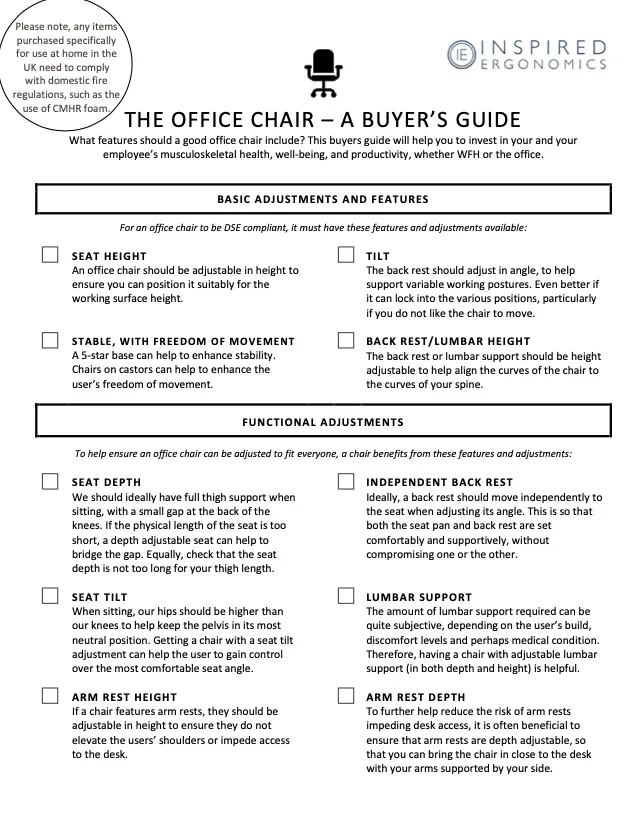
Basic adjustments and features
Start with the basic features and adjustments in our office chair checklist. These help you position the chair for your working surface and support different working postures.
Seat height
Look for a chair that adjusts in height so you can position it suitably for the height of your working surface.
Stability and freedom of movement
A five-star base can help with stability. Castors can help you move freely.
Backrest tilt
The backrest should adjust in angle to support variable working postures. If you prefer the chair to stay still, check that it can lock into different positions.
Backrest or lumbar height
Look for height adjustment so you can align the curves of the backrest or lumbar support with the curves of your spine.
Functional adjustments
A chair needs to fit the person using it. Check these adjustments to help you find comfortable support without compromising your access to the desk.
Seat depth
Ideally, your thighs should be supported with a small gap behind your knees. A depth-adjustable seat can help if the seat is too short. Check that it is not too long for your thighs either.
Seat tilt
When sitting, your hips should be higher than your knees to help keep your pelvis in a neutral position. Seat tilt adjustment gives you more control over a comfortable seat angle.
Independent backrest
Ideally, the backrest should adjust its angle independently of the seat. This lets you set both the seat and backrest comfortably and supportively.
Lumbar support
The amount of lumbar support you need depends on your build, discomfort and any medical condition. Adjustment in both height and depth can help you find the support that suits you.
Armrest height, depth and width
If the chair has armrests, check that they adjust in height without raising your shoulders or blocking desk access. Depth adjustment can help you bring the chair close to the desk. Width adjustment helps position the armrests beneath your shoulders and elbows.
Extra adjustments
If you have musculoskeletal aches or pains, extra adjustability may help. Look at how any neck rest fits you and whether the chair allows movement.
Neck rest height, depth and angle
A neck rest should adjust in height for correct alignment. Depth and angle adjustment help it suit the curves of your spine.
Movement mechanism
We are not designed to sit still for too long. A chair with a movement mechanism can encourage active sitting, helping circulation and reducing the risk of muscle fatigue and joint stiffness.
Supplier and product benefits
The service around the chair can help you decide between two similar options. Check what is included before you buy.
Warranty and repairs
Some manufacturers offer different warranties for moving and structural parts. Some warranties are not valid if the chair is used for more than a certain number of hours a day. Check the cover for your intended use.
Trial period
A chair can look suitable online, yet feel different after a few days of use. We recommend choosing a chair you can easily return if it does not suit you.
Delivery and set-up
Some suppliers offer delivery and set-up with trained professionals who explain the features and help you get the most from your chair.
Replacement parts
Some chairs have components that can be swapped or replaced. This may save you from having to buy a whole new chair.
Environmental credentials
Check the manufacturer’s environmental credentials. A number of chairs are now made with recycled parts.
Chairs for home use
Our PDF notes that items purchased specifically for home use in the UK need to comply with domestic fire regulations, such as the use of CMHR foam.
Ask an ergonomist
An ergonomic chair is one that suits you, your tasks and your environment. There is a lot of information about chairs online, and some of it can be confusing.
If you are unsure which chair or adjustments will work for you, ask your in-house ergonomist or an ergonomic partner for help. We can help you make sense of the options.
Put the advice into practice
For help adjusting your chair to you, explore our chair education and set-up service. For advice on your whole working environment, find out about a workstation assessment.